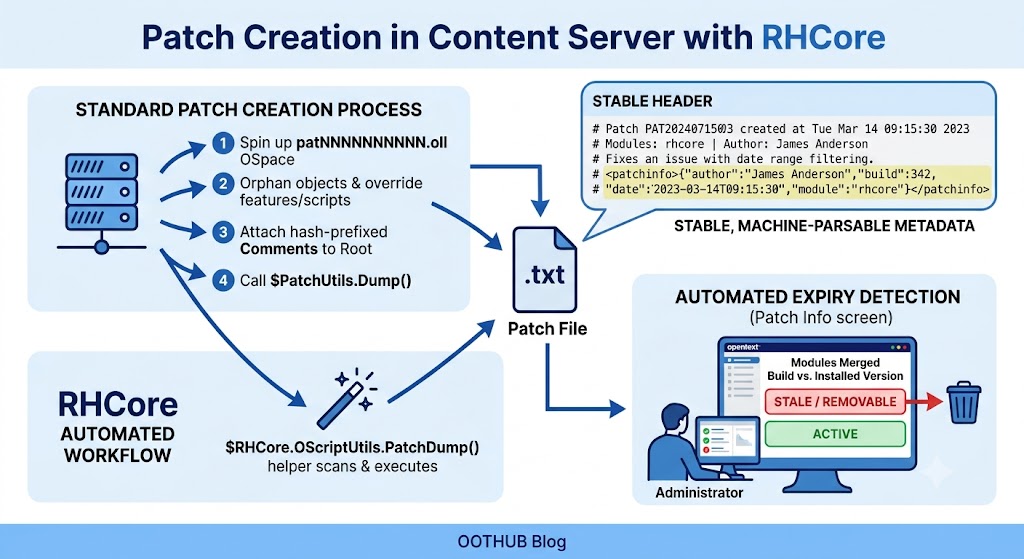
In OpenText Content Server, a patch offers a quick method for resolving bugs without upgrading an entire module. You produce a text file containing only the necessary code changes, drop it into opentext/patch/, and restart. The server reads the file on startup and merges the modifications. Removing a patch is equally straightforward — erase the file and restart again.
Patches are popular with administrators because they involve little overhead and reverting is uncomplicated. However, maintaining awareness of which patches remain relevant grows difficult over time. The patch folder accumulates files, and once a later module version incorporates the same correction, older patches turn into clutter. The only way to identify them is to open each file, examine its header comments, and judge whether it can be eliminated. When hundreds of patches are present, this manual inspection becomes unrealistic.
OpenText's Cluster Agent addresses this for its own modules, but third-party components are left out. RHCore steps in to cover the rest.
The standard process for generating a patch involves several stages: spin up an OSpace called patNNNNNNNNNN.oll, orphan the relevant objects from your module into that OSpace, override the necessary features and scripts, attach a Comments feature to the Root object with hash-prefixed documentation lines, and finally invoke $PatchUtils.Dump("patNNNNNNNNNN"). The outcome is a .txt file suitable for distribution.
RHCore compresses the final two stages. The $RHCore.OScriptUtils.PatchDump() helper scans for any open OSpace beginning with pat and executes $PatchUtils.Dump() automatically — one less detail to remember. It also fills in the Comments field by itself, producing a uniform header that lists the affected module, the build version where the fix is scheduled to be merged (which doubles as the obsolescence marker), the developer's name, and the creation date.
A typical RHCore-generated header looks like this:
# Patch PAT2024071503 created at Tue Mar 14 09:15:30 2023
#
# Modules:      rhcore
# Author:       James Anderson
# Date:         2023-03-14
# Merged:       rhcore build 342
#
# Fixes an issue with date range filtering when only one value is defined.
#
# <patchinfo>{"author":"James Anderson","build":342,
# "date":"2023-03-14T09:15:30",
# "module":"rhcore","patch":"pat2024071503"}</patchinfo>
The closing line contains a structured JSON fragment inside <patchinfo> tags that software can parse. From this header, anyone can see that the patch becomes unnecessary once RHCore build 342 or newer is in place.
RHCore contributes a Patch Info screen reachable through admin.index. This page walks through every file under opentext/patch/, pulls out the <patchinfo> metadata, and matches the merged build numbers against the versions currently installed. Patches whose fixes are already included in the running modules are marked as removable, giving administrators a straightforward dashboard of what can be cleaned up.
After several years of practical use, this workflow has proven to cut down on mistakes and manual effort. Every patch carries built-in metadata that signals when it is safe to delete, so the patch directory never becomes a dumping ground of forgotten files.